Bridging firewall - OpenBSD Setup
Network Overview
                ┌─────────────────────────────────────────────┐
                │            Router & DHCP server             │
                │                        ┌───────────────┐    │
                │                        │     Wi‑Fi     │    │
                │                        └──────▲────────┘    │
                └───────▲───────────────────────│─────────────┘
                        │                       │
                        │                       │
                        │                 ┌─────▼───────┐
                ┌───────▼─────────────┐   │ IP Cameras  │
                │**Bridging Firewall**│   │             │
                └───────▲─────────────┘   └─────────────┘
                        │
                        │
                        │
                ┌───────▼───────────────────────────────────────────────────────────┐
                │                                LAN                                │
                │   – Desktops                                                      │
                │   – Laptops                                                       │
                │   – Raspberry pi (Pi-hole)                                        │
                │   – NAS (network‑attached storage)                                │
                └───────────────────────────────────────────────────────────────────┘
The router (gateway) is reachable at 192.168.1.1
Plan for OpenBSD bridging firewall
“PF can be used to restrict what traffic goes through a bridge. Keep in mind, by the nature of a bridge, the same data flows through both interfaces, so filtering is only needed on one interface.”
Discover interfaces
$ dmesg | grep -i pci
For USB devices check /var/log/messages
$ tail -f /var/log/messages
Create bridge
# ifconfig bridge0 create
# ifconfig bridge0 add igc0 add igc1 add igc2 add igc3 blocknonip igc0 blocknonip igc1 blocknonip igc2 blocknonip igc3 up
Add to /etc/hostname.bridge0:
add igc0 add igc1 add igc2 add igc3 blocknonip igc0 blocknonip igc1 blocknonip igc2 blocknonip igc3 up
Use blocknonip on each interface to block all non‑IP traffic.
Add “up” lines to interface files
/etc/hostname.igc0
up
/etc/hostname.igc1
up
/etc/hostname.igc2
up
/etc/filename.igc3
up
- Snippet from openBSD manual for bridging ethernet interfaces.
“Bridged packets pass through pf(4) filters once as input on the receiving interface and once as output on all interfaces on which they are forwarded. In order to pass through the bridge, packets must pass any in rules on the input and any out rules on the output interface. Packets may be blocked either entering or leaving the bridge. ”
- pf configuration file
/etc/pf.conf
# Interfaces
ext_if = "igc0"                     # ext_if is connected to router 192.168.1.1 which has DHCP server.
int_if = "{ igc1, igc2, igc3 }"

# Define the local network
localnet = "192.168.1.0/24"

# Define the TCP services
tcp_services = "{ 22, 53, 80, 443 }"      # Allow SSH, DNS, HTTP, and HTTPS traffic

# Define the UDP services required
udp_services = "{ 53, 123 }"              # Allow DNS and NTP traffic

# Define the ICMP types to permit
icmp_types = "{ echoreq, unreach }"       # Allow echo requests (ping) and unreachable messages

# Define a table to block specific IP addresses loaded from /etc/iplist
table <blocklist> persist file "/etc/iplist"  # Load the blocklist from a separate file

# VPN browser extension users
table <vpn_browser> const { 192.168.1.10, 192.168.1.59 }

# Gaming PC table
table <gamers> const { 192.168.1.10, 192.168.1.40, 192.168.1.50 }

# Camera table
table <cameras> const { 192.168.1.30, 192.168.1.32, 192.168.1.33 }

# Camera watchers table
table <watchers> const { 192.168.1.10, 192.168.1.40, 192.168.1.50, 192.168.1.59 }

# Let's do all the filtering on $ext_if We don't need intra LAN filtering
set skip on $int_if

# Scrub packets to ensure proper handling
match in all scrub (no-df max-mss 1440)  # Sanitising packet content, dont-fragment, set max MSS

# Default rule to block and log all other traffic
block log all  # Log all denied packets for monitoring purposes, remove log rule later if needed

# Allow specific types of traffic from the local network
pass out on $ext_if inet proto tcp from $localnet to any port $tcp_services
pass out on $ext_if inet proto udp from $localnet to any port $udp_services
pass out on $ext_if inet proto icmp from $localnet to any icmp-type $icmp_types

# NordVPN browser extension uses TCP port 89
pass out on $ext_if inet proto tcp from <vpn_browser> to any port 89

# Internal DNS on server 192.168.1.69
pass on $ext_if proto { tcp, udp } from $localnet to 192.168.1.69 port 53

# RTSP streams from wireless
pass out on $ext_if inet proto tcp from <watchers> to <cameras> port 554
pass out on $ext_if inet proto udp from <watchers> to <cameras> port 24000:59300

# Steam for gamers
pass out on $ext_if inet proto { udp, tcp } from <gamers> to any port 27000:27100
pass out on $ext_if inet proto udp from <gamers> to any port { 4380, 3478, 4379 }

# Block traffic from and to the IP addresses in the blocklist
block log on $ext_if from <blocklist> to any
block log on $ext_if from any to <blocklist>

# Allow DHCP
pass out log on $ext_if inet proto udp from 0.0.0.0 port 68 to 255.255.255.255 port 67
pass out log on $ext_if inet proto udp from $localnet port 68 to 192.168.1.1 port 67
pass in log on $ext_if inet proto udp from 192.168.1.1 port 67 to $localnet port 68
Note: This is not the final pf.conf I used. It might contain syntax errors and other shit.
I'm not sure if DHCP traffic is treated like any other UDP traffic in a bridging firewall.
I'm not going to ask some silly billy OpenBSD nerd whether it is or not and witness a mental episode.
- Useful commands -
 # tcpdump -n -e -ttt -i pflog0
 # pfctl -vvsr | grep ^@
 # tcpdump -l -e -n -ttt -r /var/log/pflog | grep "rule 1"
- System updates -
$ tail -f /var/log/messages
Plug in USB‑to‑Ethernet adapter (ure0):
# echo dhcp > /etc/hostname.ure0
# ifconfig ure0 up
# sh /etc/netstart ure0
Alernative is to add static IP
# echo inet 192.168.1.6 255.255.255.0 > /etc/hostname.ure0
# echo nameserver 9.9.9.9 > /etc/resolv.conf
# echo 192.168.1.1 > /etc/mygate
# ifconfig ure0 up
# sh /etc/netstart ure0
Add to pf.conf:
ext_if2 = "ure0"
Add after block all:
pass out on $ext_if2 inet
Enable new rules:
# pfctl -f /etc/pf.conf
Run updates or whatever you need:
# syspatch
# pkg_add -u
# sysupgrade
# fw_update
After everything is updated, comment out the added lines in pf.conf:
Enable new rules:
# pfctl -f /etc/pf.conf
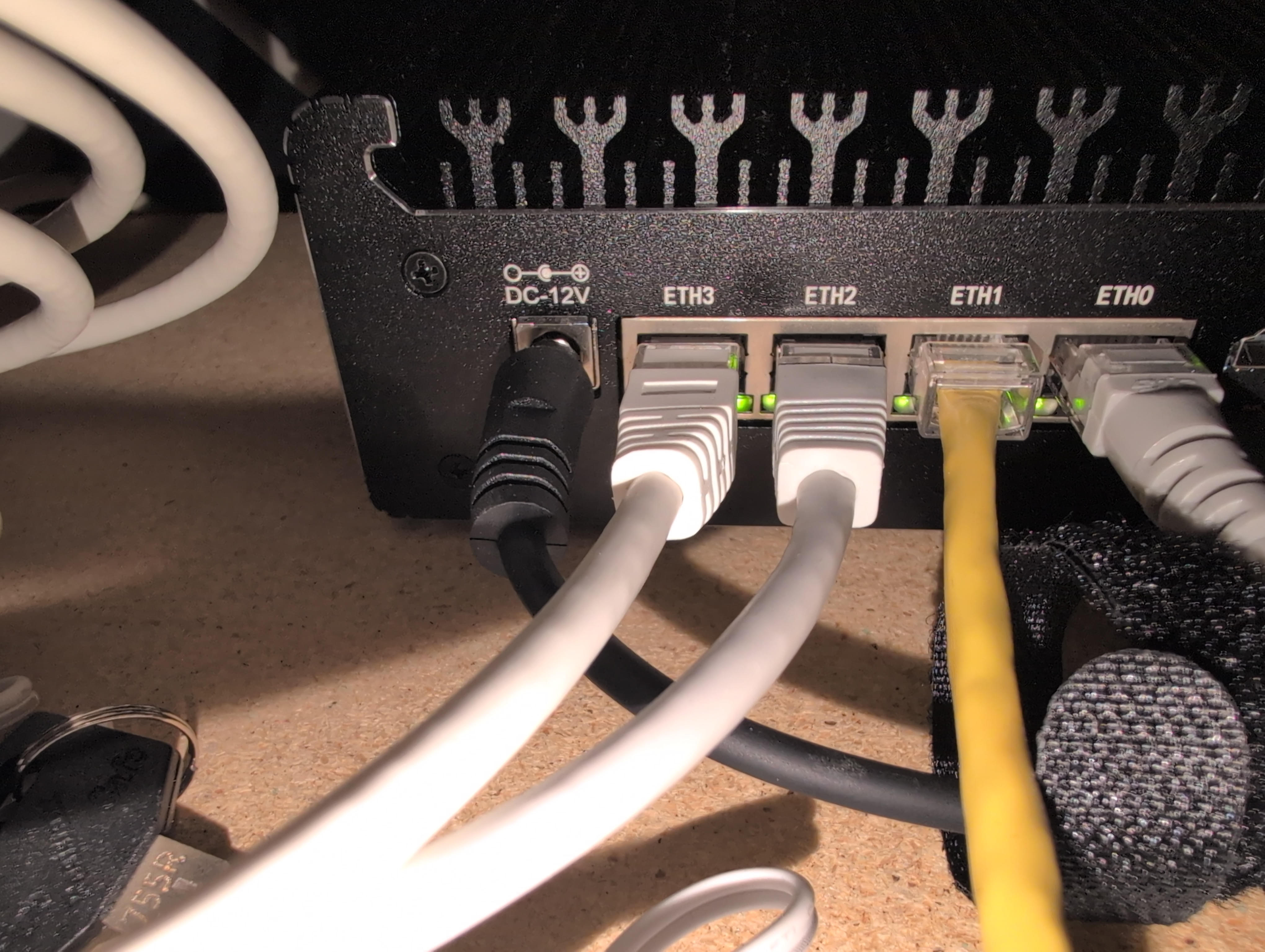
Bridging firewall in action.
Heikki Vuojolahti